
Use this checklist to track the Partner’s progress or to plan ahead
Flow1st Integration Overview
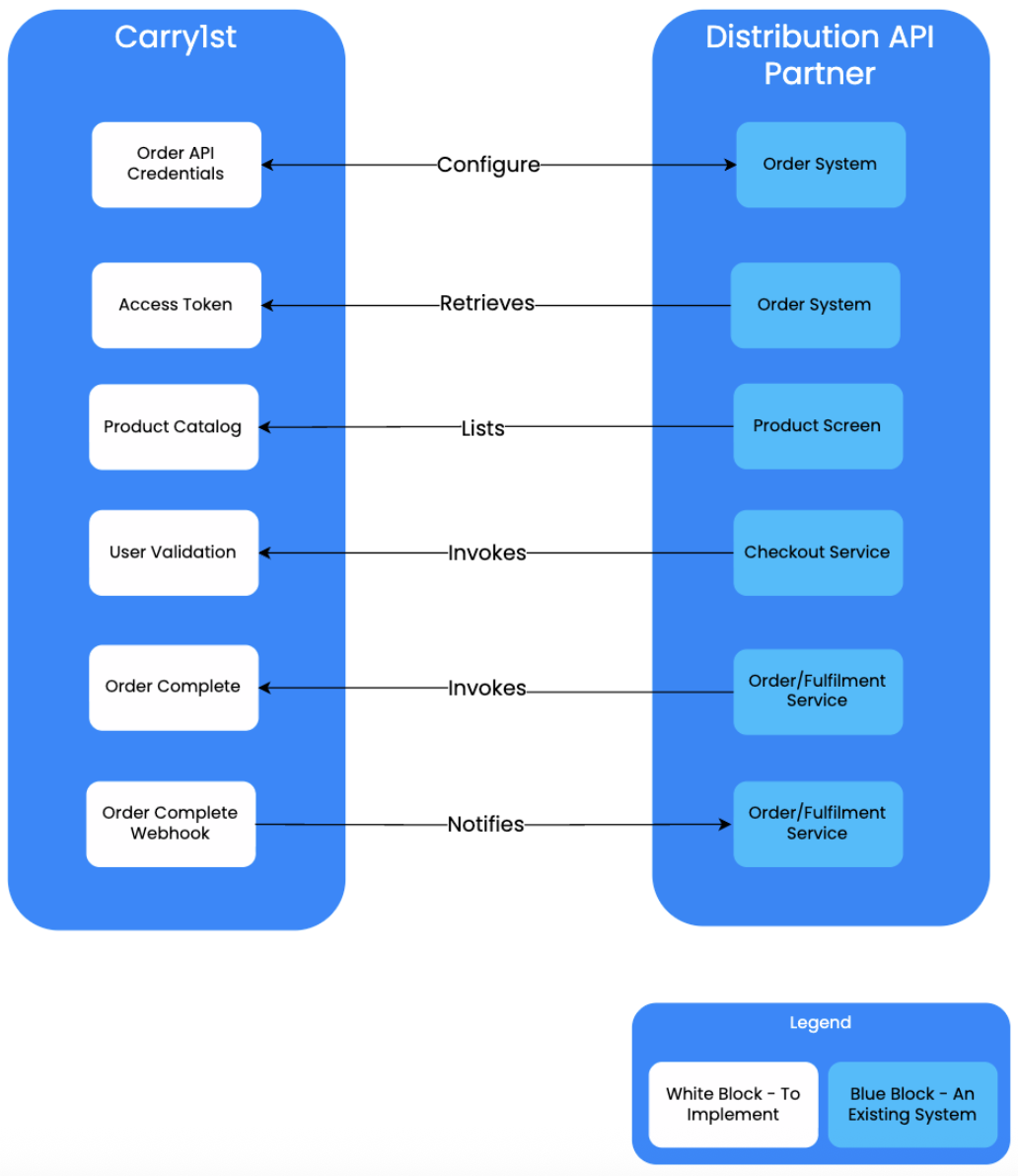
This integration allows the Partner to place orders on the Flow1st Platform.
The steps in this integration style involve:
- Configuring the Partner Profile and Configuring API Credentials
- Configuring Webhooks
- Implementing the Authentication - Generate Access Token API for authentication purposes
- Implementing List Product Catalog API that Customers will choose Products from
- Implementing the User Validation API
- Implementing the Order Completion API
- Receiving the Order Complete Webhook Request to process concluded orders
Pre Requisites
These are the pre-requisites that are needed from the Flow1st Partner
- A list of email addresses that would need to be invited to the Flow1st Admin Console
- A communication method to be set up: Slack is preferred, but alternative communication tools (WeChat, Teams, Telegram, etc.) can be used as well
Checklist
The following table is a checklist that can be used for tracking progress or for project management purposes. The completion time of a project is largely dependent on
- Whether a Flow1st partner already supports user validation in their UX flows
- Whether a Flow1st partner has an easily extendable orders/fulfilments architecture
| Estimated Time (in days) | Team Members | Task |
|---|---|---|
| ~0.5 | Flow1st Partner | All supplied email addresses will receive a welcome email from Carry1st. The steps in this email need to be completed to complete registration |
| ~0.5 | Flow1st Partner | The Flow1st Partner will Configure their API Credentials to use for the integration. |
| ~2 | Flow1st Partner’s Development Team | Implement the Authentication - Generate Access Token |
| ~1 | Flow1st Partner | The List Product Catalog API needs to be integrated to list Products to purchase |
| ~2 | Flow1st Partner’s Development Team | Implement the User Validation API |
| ~2 | Flow1st Partner’s Development Team | Implement the Order Completion API |
| ~2 | Flow1st Partner’s Development Team | Configuring Webhooks in order for the Flow1st Partner’s server to acknowledge the Flow1st API about order completion |
| ~1 | Flow1st Partner and Flow1st Implementation Manager | Do a full end to end test Order in the Sandbox/Staging Environments |
| ~2 | Flow1st Partner | Replicate the staging configuration for production. |
| ~0.5 | Flow1st Partner | Top-up the production account balance |
| ~0.5 | Flow1st Partner or Flow1st Implementation Manager | Do a UAT production test using this configuration. |
| Total: ~14 | Go Live! |